Overview
This document will walk you through setting up an integration with Huntress in your ImmyBot instance.
Setting up this integration allows you to:
- Agent identification by adding an inventory script to be run against all of your endpoints
- Importing agents from linked clients into ImmyBot
- Mapping clients from the integration to tenants in ImmyBot
- Getting an install token for a specific client
- Getting the URL for an agent at the external provider’s site
Prerequisites
An active ImmyBot subscription or trial
Admin access to your Huntress account
Process
Gather Huntress Integration Information
- Log into your Huntress Account
- Click the menu drop down and select Download Agent
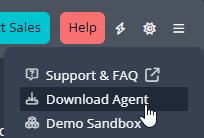
- Expand the Get Your Keys section of the page and copy your Account Key
- Create an API user with a Read-Only role
- Click the menu drop-down and select API Credentials
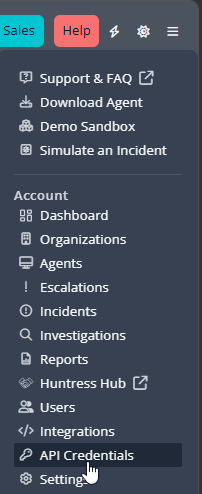
- Under User API Credentials, click Add
- Select the Read-Only user that was created earlier and click Create.
- The API Secret will only be shown once.
- Copy the API Key and API Secret
Note
The account API credentials can be used, but they have more permissions than necessary.
Set up the Integration with ImmyBot
- Navigate to Show More > Integrations
- Click add integration
- Click Huntress
- Change the name of the integration if desired.
- Input your Account Key
- Input API Key and API Secret
- Click update
- Toggle your capabilities (see above for more information)
- Toggle the enable integration switch
- Click on the Clients tab to link your Huntress Sites to your ImmyBot tenants
Note
While Huntress can be installed without linking clients, as the install script will fall back to the ImmyBot Tenant name if the client is not linked and the deployment parameter is configured to allow that fallback. Other functionality will not be available if the client is not linked. This does mean you can install the Huntress agent using ImmyBot and then link the client in the integration afterwards with the suggested mappings.