Set a rule once and enforce it everywhere.
Deployments are how ImmyBot knows what to install, configure, and maintain across every endpoint. You define deployments once and ImmyBot keeps every machine in compliance automatically.
You create the rules
Install, update, remove, or configure what each endpoint needs and only when it needs it. Your rules. Your control.
Flexible targeting
ImmyBot deployments use your tags, assignments, and client logic to determine what belongs on each machine.
Deployments on your schedule
You determine if a deployment is required globally, if it should run only during onboarding, or if a one-off deployment is necessary.
Built-in exceptions
Every MSP has the one end point with a special need. ImmyBot maintains standards across your clients with enough wiggle room to handle one-off exceptions.

The Problem
Manually managing software gets complicated fast
RMM scripts can push software. Intune can handle some policy. But neither one gives MSPs a simple, repeatable way to say: “This is how every endpoint should be configured, except where this client, user, device, license, tag, or agreement says otherwise.”
- No single source of truth
Each client has different software tracked in different spreadsheets or worse, nowhere at all. - Version drift goes unnoticed
Software gets uninstalled, misses updates, or falls out of compliance without monitoring. - Repetitive installs eat technician time
Your techs monotonously install the same twenty apps manually on every new machine, every single time. - Offboarding software is forgotten
When a client churns, their licensed software lingers on machines without automated cleanup.

The ImmyBot way
You create the rules, ImmyBot does the work.
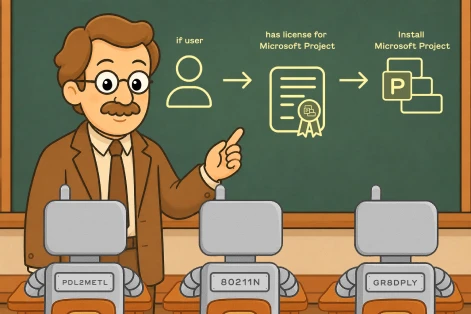
Instead of managing software client by client, you define the rule once and leave the rest to the bot. ImmyBot evaluates endpoints, resolves matching deployments, checks for what is already installed, executes the needed actions, verifies the result, and reports back on what happened to boot.
- Software deployments
Install, update, or remove applications on a schedule you set. ImmyBot keeps software at the version you specify and reinstalls it if it’s ever removed. The bot’s got you. - Task deployments
ImmyBot runs PowerShell scripts to configure systems, join domains, create user accounts, enforce settings, or execute any custom automation logic. - Precise targeting
Apply your rules across all your tenants, to a single client, to specific tagged machines, or to any dynamic group defined by a PowerShell filter script. - A single source of truth
ImmyBot integrates with your PSA and RMM to drive every deployment, every new hire, every new client, automatically.
How deployments work
Define what you’re deploying, who gets it, and when it should run. ImmyBot handles everything else.
Walk away!
No, seriously. Have a coffee. Do something else. Leave it to ImmyBot to maintain endpoints at a maintenance schedule you define. During these “maintenance sessions,” ImmyBot will identify the deployments that apply, detect the current state, build a plan, execute the actions, check the result, and report the outcome.
Your next deployment doesn’t need another one-off script
Start your free 14-day trial and create your first deployment in minutes. No credit card required. All features included.
The right level of control for every situation
You’re in control of three types of deployments. “Required” maintains your desired state at all times. “Onboarding” is a one-time setup task. “Ad Hoc” lets you run a task manually when you need it.
| Type | When it runs | Best for | Example |
|---|---|---|---|
| Required | Every maintenance session, automatically | Standard software stack, security tools, configurations that must always be present | EDR agents, Microsoft 365, browser settings, BitLocker |
| Onboarding | Once, during initial computer setup | One-time configurations, domain join, user profile creation, first-boot installs | Domain join, primary user setup, initial app installs |
| Ad Hoc | When you manually trigger it | Diagnostic tools, temporary fixes, one-off tasks you don't want on a schedule | Cleanup scripts, temporary diagnostic tools, migration tasks |
Everything you need to manage software at scale
Cross-tenant deployments
One rule applies to every client. No duplication, no drift. Override or exclude per client as needed. The most specific rule always wins.
Onboarding-only deployments
Apply software and configuration once during initial setup. These deployments never run again. Perfect for domain joins, user account creation, and first-boot installs.
Desired state enforcement
If a required deployment’s software is removed or misconfigured, ImmyBot reinstalls and reconfigures it on the next maintenance session. No manual intervention needed.
Per-client overrides
Different clients may need different software versions or configurations. Override any cross-tenant deployment at the tenant level without touching the global rule.
Filter scripts
Write your own PowerShell scripts to define exactly which computers qualify. Target by hardware model, OS version, installed software, registry values, or any custom logic.
Full audit logging
Every deployment action is logged with full output. What ran? What changed? What failed and why? Every maintenance session is a complete audit trail.
Tag-based targeting
Tag computers by role, location, client type, or any custom attribute. Use those tags to target deployments to exactly the right machines without writing filter scripts.
Deployment dependencies
Some software requires other software to be installed first. Define hard or soft dependencies between deployments. ImmyBot guarantees correct install order automatically.
Offboarding deployments
Set a deployment’s desired state to “uninstalled.” When a client offboards, ImmyBot automatically removes software on their next maintenance session. No more manual cleanup.
Frequently Asked Questions
What's the difference between a deployment and just installing software manually?
A manual installation is a one-time action. A deployment is a persistent rule that ImmyBot enforces on every maintenance session. If the software is removed or falls out of the desired state, a Required deployment will reinstall or reconfigure it automatically without anyone noticing or intervening.
Can I have different software versions for different clients?
Yes. You can create a cross-tenant deployment that applies to all clients and then override the version, configuration, or enforcement type at the tenant level for specific clients. The most specific deployment always takes precedence: per-computer overrides beat per-tenant, which beat cross-tenant.
What happens if two deployments conflict on the same computer?
ImmyBot’s resolution engine determines the winning deployment based on specificity. A deployment targeting a single computer always beats one targeting all computers in a tenant, which beats a cross-tenant rule. You can also mark a deployment as “Ignored” to explicitly exclude specific computers or clients from a broader rule.
Can I test a deployment before rolling it out to all clients?
Absolutely. Use Ad Hoc enforcement to run a deployment manually on a single test computer, or limit the target scope to a small tag or single tenant before expanding. You can also use the Windows Sandbox integration to test software installations in a disposable environment without touching a production machine.
How does an Onboarding deployment differ from a Required deployment?
An Onboarding deployment runs exactly once — during the computer’s initial setup session. It never runs again, even on subsequent maintenance sessions. This makes it ideal for one-time configurations like domain join, user account creation, or initial app installs that shouldn’t be enforced repeatedly. A Required deployment, by contrast, runs on every maintenance session and continuously enforces desired state.
Do deployments work with other package managers?
Yes. ImmyBot deployments support software from the global library and custom PowerShell-based installations. You can also mix sources — use the global library for common apps and custom packaging for proprietary software — all managed through the same deployment interface.
What if a software installation fails?
ImmyBot logs the full output of every action, including failures. You can review exactly what happened and why from the maintenance session log. Required deployments will retry on the next maintenance session. You can also manually trigger a re-run after diagnosing and fixing the root cause — no additional configuration needed.
Does ImmyBot work if a computer is offline during a maintenance session?
Yes. ImmyBot’s maintenance sessions only run on computers that are online and connected to the ImmyBot agent. Offline computers are skipped and will be picked up on the next scheduled session. You can configure maintenance windows to maximize the chance of reaching all endpoints.
Is it secure enough for our healthcare and finance clients?
Yes. ImmyBot is SOC 2 Type II certified, with isolated per-customer instances (dedicated database, queue, and secrets vault — no shared rows). The agent is outbound-only over TLS on port 443, so no inbound firewall rules.
1900+
pre-written scripts
2 hours
average time saved
onboarding a computer
74M+
Deployment sessions per year
“We wouldn’t have been able to grow as fast as we did without ImmyBot.”

—Anthony Birone Founder of ElasticIT
Ready to try it for yourself?
Try out every feature of ImmyBot firsthand with our free trial, and discover exactly how it can streamline your workflow—risk-free and commitment-free.
Start your free trial
14-day free trial. No credit card required.