Integrate your stack. Skip the checklist.
Plug in your PSA, Microsoft 365, remote access, and RMM, and they stop being silos. They become the sources of truth that drive every deployment, every new hire, every new client, automatically.

If you use ImmyBot like an RMM, you’re missing out.
Most platforms ask you to manage every client like a fresh project. New tenant. New checklist. New checkboxes for the things you always forget. Multiply all of that by every client and every new hire. How are you supposed to keep up?
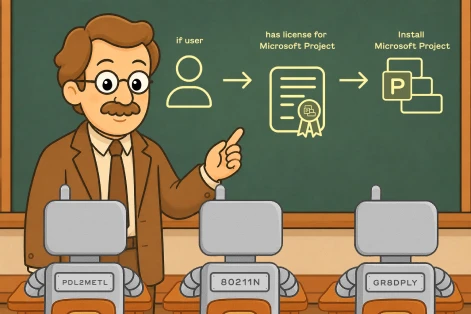
ImmyBot asks you to take a different approach. Stop typing the same things twice. Your PSA already knows your clients. Your 365 tenant already knows who has a Project license. Your directory already knows who’s in the accounting group. Those are the sources of truth. When you connect them, deployments stop being checklists and start being rules that follow your business.
Things start running themselves
One-click tenant setup
Connect your PSA and every client tenant gets created and linked for you, instead of typed in one by one. New client added in your PSA? It shows up here, ready to deploy against.
Configuration that sticks
Don’t just install software. Configure it. VPN profiles, security agents, browser defaults, registry tweaks, the kind of work that usually pins a tech to the keyboard, gets handled in the background and stays handled.
Group-driven installs
Software like QuickBooks lands on the right machines automatically by following the same groups you already manage in your directory. The accounting team gets the accounting tools. Nobody else does.
New hires, handled
Add a user to the right group and the deployments they need follow them to whatever computer they sit down at. Onboarding becomes a directory change, not a tech ticket.
One platform, every source of truth
Each integration takes minutes to setup and turns your existing tools into something our deployment engine can read from. Connect what you have. Skip what you don’t.

Microsoft Azure & Entra ID
Deploy software based on who your users are and what they’re licensed for — automatically, across every customer tenant.
- Auto-install Microsoft 365 apps based on license assignments
- Deploy to Azure Teams and Security Groups by name
- Full GDAP multi-tenant support for MSPs
- Sync users from Azure tenants including CSP customers
Learn more

NinjaRMM
Plug ImmyBot into your NinjaRMM workflow with zero friction. Manage NinjaRMM-monitored devices through ImmyBot without additional agent deployment.
- Import customers and computers from NinjaRMM
- Manage all NinjaRMM endpoints without deploying the ImmyBot Agent
- Execute remote operations through NinjaRMM’s automation scripting layer
- Create a dedicated ImmyBot role within NinjaRMM for secure access

Acronis
Automate Acronis backup agent deployment across your entire managed base. Dynamically retrieve installers, import devices, and ensure every endpoint is protected.
- Retrieve Acronis agent installers dynamically from a URL
- Identify Acronis agents across all managed endpoints
- Import agents from linked Acronis clients into ImmyBot
- Map Acronis clients to ImmyBot tenants

ConnectWise Automate
Bridge ImmyBot and ConnectWise Automate for unified device and customer management — no ImmyBot Agent deployment required on existing machines.
- Import customers and computers from Automate automatically
- Manage all Automate machines without deploying the ImmyBot Agent
- Map customers in bulk using existing Automate-Manage relationships
- Apply approved Windows Updates through ImmyBot via Patch Manager
ConnectWise ScreenConnect
Turn every ScreenConnect session into a fully managed endpoint. Import devices, launch remote sessions, and run automated inventory — all from within ImmyBot.
- Import customers and computers from ScreenConnect
- Manage all endpoints without deploying the ImmyBot Agent
- Launch remote sessions to endpoints directly from ImmyBot
- Use ScreenConnect’s agent to repair or reinstall the Automate agent

N-able N-Central
Extend N-Central’s reach with ImmyBot’s automation engine. Import your entire device inventory and manage endpoints through N-Central’s existing infrastructure.
- Import customers and computers from N-Central
- Manage all N-Central endpoints without deploying the ImmyBot Agent
- Execute scripts and automation via N-Central’s existing infrastructure
- Map N-Central clients to ImmyBot tenants for unified management

Datto RMM
Bring Datto-managed devices into ImmyBot’s automation workflows. Run scripts via Quick Jobs and import your entire Datto-managed device inventory.
- Run scripts on devices via Datto RMM Quick Jobs
- Import agents from linked clients into ImmyBot
- Map Datto clients to ImmyBot tenants
- Generate per-client install tokens for streamlined agent rollout
ConnectWise Manage
Turn service tickets into deployment triggers. Deploy software based on agreements, jump into endpoints from tickets, and keep your PSA and endpoint management in sync.
- Deploy software to all machines on a specific agreement type (e.g., all Managed Security customers)
- Deploy software based on specific agreement additions or line items
- Map user emails in tickets to associated computers automatically
- Access ImmyBot Technician Tools as a pod inside ConnectWise service tickets

HaloPSA
Bridge your Halo service desk and endpoint management. Deploy software based on contract terms and give technicians an ImmyBot-powered tab inside every ticket.
- Deploy software to machines covered by specific contract types
- Target deployments by recurring invoice item on a customer’s contract
- Access ImmyBot’s Technician Tools as an embedded tab inside HaloPSA tickets
- Map HaloPSA clients to ImmyBot tenants for synchronized organization

Autotask
Keep your Autotask PSA and ImmyBot in sync. Map clients and import group structures to mirror your Autotask organization within ImmyBot.
- Map Autotask clients to ImmyBot tenants
- Retrieve client groups and group memberships from Autotask
- Organize your ImmyBot tenant structure based on Autotask data

ConnectSecure
Identify and manage all ConnectSecure-monitored endpoints from ImmyBot. Automate agent deployment and keep your security tooling synchronized across clients.
- Identify agents across all endpoints via automated inventory scripts
- Import agents from linked ConnectSecure clients into ImmyBot
- Map ConnectSecure clients to ImmyBot tenants
- Generate per-client install tokens for automated deployment

Beachhead Secure
Deploy and manage Beachhead Secure agents through ImmyBot’s automation. Retrieve installers dynamically and roll out to all clients without manual downloads.
- Retrieve Beachhead agent installers dynamically from a URL — no manual downloads
- Map Beachhead clients to ImmyBot tenants
- Generate per-client install tokens for secure, automated deployment

Nodeware
Automate Nodeware agent deployment and management at scale. Import Nodeware-managed devices and keep your vulnerability management tooling deployed everywhere it needs to be.
- Retrieve Nodeware agent installers dynamically
- Identify and import agents across all endpoints via inventory scripts
- Map Nodeware clients to ImmyBot tenants
- Generate per-client install tokens for streamlined rollout

Kaseya VSA
Connect Kaseya VSA to ImmyBot and manage your entire VSA device inventory without requiring additional agent deployment.
- Import customers and computers from Kaseya VSA
- Manage all VSA endpoints without deploying the ImmyBot Agent
- Execute scripts on endpoints through VSA’s existing infrastructure
- Map VSA clients to ImmyBot tenants for unified management

Idemeum
Deploy passwordless authentication and endpoint privilege management to every customer from ImmyBot — with automatic tenant creation, no pre-setup required.
- Deploy the Idemeum agent to endpoints via ImmyBot deployments
- Auto-create Idemeum customer tenants — no pre-setup needed.
- Map Idemeum customers to ImmyBot tenants via Catalog integration
Build your own integration
Don’t see your tool? ImmyBot’s dynamic integration framework lets you connect any platform — no waiting for us to build it.
- Global and per-tenant custom integrations
- Same capabilities as built-in integrations
- Full PowerShell scripting access
- Share integrations with the ImmyBot community
Frequently Asked Questions
Do I have to set up every integration before ImmyBot is useful?
No. You can connect what you have and skip what you don’t. That said, the more sources of truth ImmyBot can read from, the less ongoing maintenance burden will be. The PSA and Microsoft 365 integrations tend to deliver the most leverage as it allows you to target software based on what your customer is paying you for. Whereas the alternative is adding and removing deployments for each item in your stack for each customer or maintaining tenant tags that usually are 1:1 with recurring agreement items or their agreement type.
How long does it take to set up an integration?
Most take five to ten minutes each. The most time consuming part is typically getting logged in as an admin into these systems to generate the required keys.
Will connecting my PSA or RMM mess anything up in those tools?
Integrations are primarily read-only. ImmyBot reads data from your existing tools to inform its deployments. PSAs for example read your agreement types, agreements, and product catalog which are used to create deployments. RMM integrations allow Immy to import your fleet of machines and run its inventory scripts on them. Immy will never run a script that changes anything on the machines without a deployment and a schedule/manual trigger. Some newer PSA functionality writes back your computers into your PSA so you can leverage Immy’s amazing user-computer affinity feature to keep the correct PSA contact associated to each computer (and not just the last logged on user like most RMMs sync to your PSA). This behavior is opt-in and requires explicit configuration.
What if I use a PSA, RMM, or remote tool that isn't on your integrations list?
You can create your own integrations using PowerShell inside of ImmyBot. If you aren’t adept to PowerShell and don’t trust your vibe-coding skills, tags can serve as a manual source of truth for cases where no native integration exists. You create a tag, apply it to the relevant tenants, users, or computers, and target your deployments at that tag. It’s not as automatic as a true integration, but it lets you keep the same rules-based deployment model.
Can I target a deployment based on something other than a license or a group?
Yes. Deployments can be scoped by tenant, by primary user, by directory group membership, by tag, by computer type (workstation, server, portable), by PSA contract, or by custom script logic. Most real-world deployments combine a few of these.
How does ImmyBot know who the primary user of a computer is?
It infers this from sign-in patterns and machine usage data automatically. You don’t have to manually assign users to machines. One admin sign-in does not flip the associated user. A new user will have to be signed in for over 24 hours before the primary user is flipped. Additionally, we resolve this user to their user in 365 so you have rich directory information and not just samAccountName.
What happens when I add a new client to my PSA? Do I have to set them up in ImmyBot too?
Yes, currently you have to manually map them from the integration’s Client mapping page. We don’t automatically create new tenants we discover after the initial import as to prevent duplicates. Don’t worry if you did bulk import from multiple sources we will string-match on exact case-insensitive client name and we also have a merge tenant feature. Eventually we will allow you to designate one integration for auto-import so the tenant can show up automatically and then you just simply map the tenant on the other integrations.
What happens when an employee at one of my clients is added to a new directory group?
Any deployment that targets that group will start applying to them, including on whatever computer they’re the primary user of. This is how new hires get their full software stack without anyone manually provisioning them. Assuming you have a Schedule created for this client the software targeted to that group will be installed on their machine during the next scheduled maintenance.
Do I need a Microsoft 365 connection for ImmyBot to work?
You at least need an Entra tenant to sign into ImmyBot, as that is our authenticate layer. Beyond that, most MSPs find Microsoft 365 valuable because so much of the modern stack (identity, license entitlements, group membership) lives there. If your clients are predominantly on Google Workspace or another identity platform, you’d lean more heavily on directory or PSA integrations instead.
1,800+
pre-written scripts
2 hours
average time saved
onboarding a computer
74M+
Deployment sessions per year

“We wouldn’t have been able to grow as fast as we did without ImmyBot.”

—Anthony Birone Founder of ElasticIT

Ready to try it for yourself?
Try out every feature of ImmyBot firsthand with our free trial, and discover exactly how it can streamline your workflow—risk-free and commitment-free.
Start your free trial
14-day free trial. No credit card required.