Your users and the ImmyBot support team can now request access to your instance! When an unauthorized person authenticates, a “Request Access” button is available that will submit an access request. An MSP user can then grant or deny access from the user list page. An expiration of one hour, one day, or never can be set for the user.
The access request feature can be enabled/disabled on the preferences page.
Improvements
Made some small improvements to the User list page
Added auto refreshing to the new computers page
Made the session list on the computer details page reload when it is shown
Bug Fixes
Removed some extra whitespace showing on the tenant details page
Fixed a bug when using custom download scripts where the action would fail with An item with the same key has already been added
Changed “Triggered By” text from “Unknown” to “System – Automatic Onboarding” for maintenance sessions that onboard automatically
Changed parameter text from “override” to “specify” when a default valued is not specified
Fixed a bug where deployment parameter notes were not honoring line breaks
Changed the default target filter from No Filter to Workstations and Portable Devices
Fixed an error in metascripts, Tee-Output : Cannot bind argument..., that would occur if you ran the script $null, which should return null
Fixed a browser caching issue which would cause new features and bug fixes to not be immediately available when updating ImmyBot
Fixed an issue where the end time of the ImmyBot agent update action was not getting set, causing the time running to continually increase
Fixed an issue with the ImmyBot Chocolatey Feed app preference not updating when toggled
0.48.6
Released 2021-12-06
Bug Fixes
Fixed a bug where deployments targeting an integration were getting deleted when updating to a different target type
0.48.5
Released 2021-12-03
Bug Fixes
Fixed a bug where failed test scripts run after an install were not setting the action to non-compliant
0.48.4
Released 2021-12-03
Bug Fixes
Fixed an issue with some ImmyBot instances not being able to run scheduled jobs
Fixed a bug with basic downloads failing because paths were using forward slashes instead of backslashes. This was causing all license downloads to fail.
0.48.3
Released 2021-12-02
Improvements
Added logout and switch user buttons to the landing page when you are signed in as an unauthorized user
Bug Fixes
Fixed a bug where completed configuration tasks were incorrectly showing the message “Action interrupted”
Fixed a bug where providers failing to initialize were not getting disabled, causing them to continually throw exceptions
0.48.2
Released 2021-12-01
Bug Fixes
Fixed an issue with internal packages behaving incorrectly on the new Linux backend
Fixed a caching bug that was showing the previously viewed maintenance session details when switching to a different computer
0.48.1
Released 2021-11-30
Improvements
Ephemeral Agent now uses Win32API directly to invoke Powershell, replacing the WMI calls which suffered from System.PlatformNotSupportedException: The native library 'C:\Windows\Microsoft.NET\Framework64\v4.0.30319\wminet_utils.dll' does not have all required functions. Please, update the .NET Framework. errors on some specific machines.
Bug Fixes
Resolves issue with Ephemeral Agent sometimes launching PowerShell in 32-bit mode
Added additional error logging when maintenance task get/set/test fail
Fixed an issue with file paths containing “/” instead of “”
Added back missing metascript aliases
Resolved ‘AmsiContext’ warnings being spammed in frontend
Improved the readability of the Azure page
Added an alert to the user page about creating new users
Replaced references to “Immybot” with “ImmyBot”
0.48.0
Released 2021-11-29
IMPORTANT
The changes in this release will require reconsent at first login!
ⓘ If your Azure AD is configured to not allow non-Admin users to consent to new apps, you will need to login once as a user with sufficient privileges.
Consolidated backend and frontend into a single Enterprise Application (Service Principal)
Removed backend.subdomain.immy.bot and pointed all API calls to subdomain.immy.bot
This has the additional benefit of increasing performance as the browser no longer makes a CORS pre-flight check when hitting the API
Note: If you are using the ImmyBot API, you will need to remove backend. from your URI
0.47.12
Released 2021-11-29
Bug Fixes
Fixed a bug introduced in 0.47.11 where BITS downloads fail for files that do not specify an MD5 hash
0.47.11
Released 2021-11-24
Improvements
Files without MD5 hashes will now always get overwritten for better security.
Bug Fixes
Fixed Ephemeral Agent PowerShell execution failures on some machines
Fixed an issue with nested exceptions not showing the correct output
0.47.10
Released 2021-11-23
Improvements
Ephemeral Agent EXE respects global proxies for https:// even though it uses wss://
Bug Fixes
Fixed issue where Ephemeral Agent EXE failed to launch due to an extraction issue on Windows Server Core
0.47.9
Released 2021-11-22
Bug Fixes
Fixed an issue with inventory and script-run cancellation logic causing high memory usage
Fixed an issue with function scripts being used in metascripts causing heavy load on global database
Switched to force Ephemeral Agent EXE to utilize System Proxy settings to alleviate connection refusal for some users
Fixed an issue with PowerShell execution occasionally throwing an error that would crash ImmyBot
0.47.8
Released 2021-11-17
Features
Ephemeral Agent EXE
The ephemeral agent now executes as an .exe instead of a PowerShell script.
This allows us to use a WebSocket instead of polling, which improves performance and resiliency as we can immediately detect disconnections.
Decreased initial connection time by attempting to connect using all RMMs simultaneously instead of in sequence.
Substantially improved logging to help troubleshoot script execution issues
Note: You may have to exclude your instance’s hostname in the firewall from SSL Inspection policies! SSL Inspection may interfere with the WebSocket connection from this new agent!
Note: You may also need to adjust your security software to allow the EXE to execute. We recommend adding an exclusion for the Immense Networks code signing certificate as it will be used to sign all ImmyBot PowerShell scripts and Executables.
ImmyBot will always overwrite license files to prevent issues with software not activating because the previous license file is still in the ImmyBot download folder.
The script terminal on the computer details page is no longer cleared when swapping between tabs.
Updated the instance disabled text to specify that only an admin user can re-enable immy
Bug Fixes
The EXE ephemeral agent addresses intermittent ScriptTimeout exceptions that would occur for a variety of reasons
Implemented a “Script Execution Circuit Breaker” per computer to prevent RMM overload when retrying ephemeral connections (This can happen when security software blocks execution or firewalls prevent outbound connections)
Fixed several issues around script error handling. Line numbers now display correctly. Exceptions that occur before running a script are now caught and displayed properly.
Fixed an issue where inventory output with a value of null was being treated as successful and overwriting good results
Fixed a bug with session logs showing null references when a script was cancelled or timed out
Fixed a bug with quick deploy where the deployment resolution stage was unnecessarily reaching out to the computer to retrieve its software
Fixed a bug during maintenance sessions, Field at index '1' does not exist..., where retrieving the list of installed chocolatey software would fail
Resolved a potential issue around re-acquiring ephemeral agent sessions under concurrent script execution scenarios
Fixed a bug when re-authenticating to ImmyBot where you wouldn’t be redirected to the page you were previously on due to the URL not including query parameters
0.47.0
Released 2021-10-28
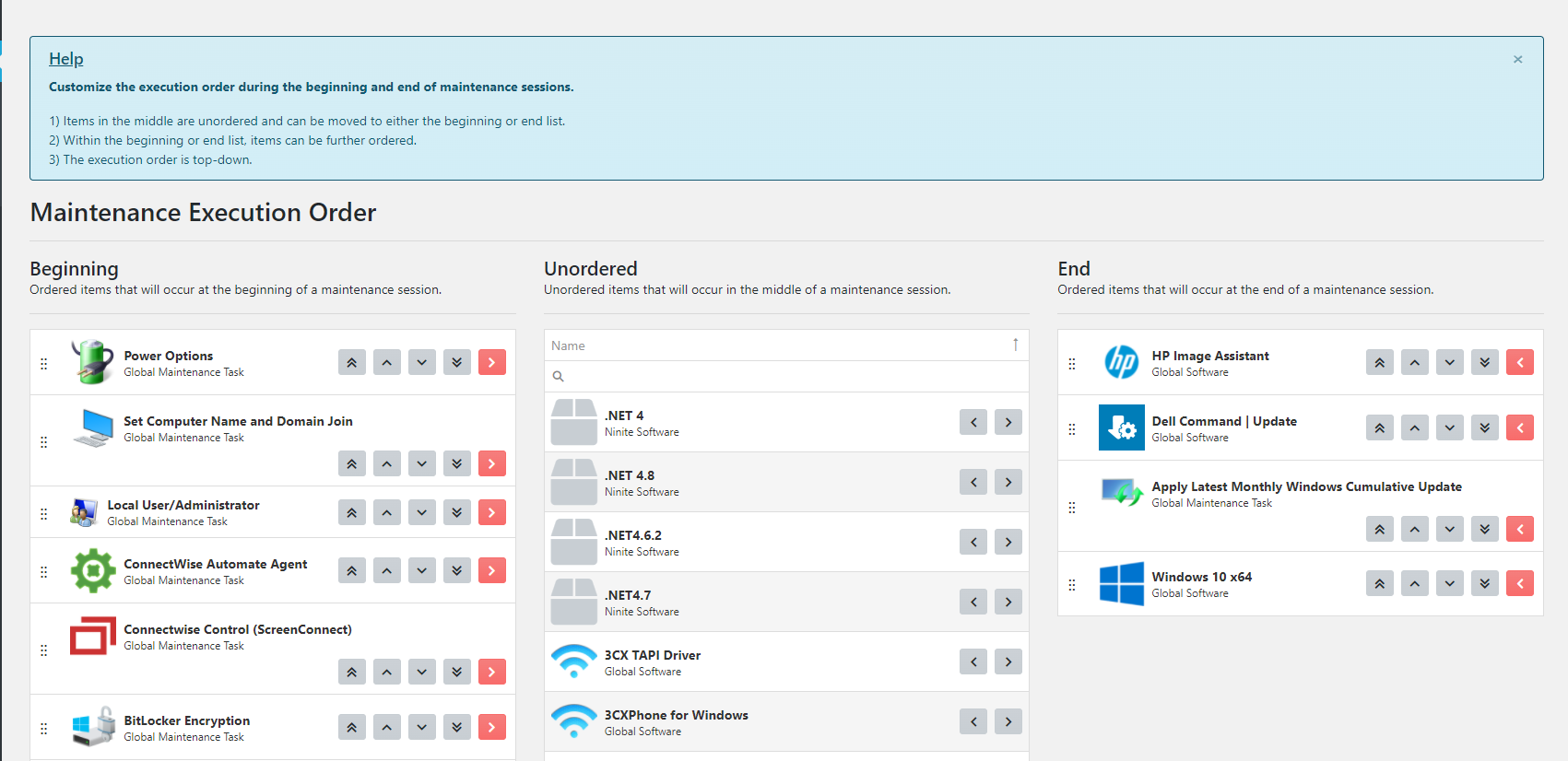
Maintenance Execution Order
You can now specify the order in which maintenance items are executed by navigating to “/deployments/ordering” or by clicking the “Ordering” link in the side nav bar under “Deployments”.
Other Improvements
Made the software, maintenance task, script, and media list pages default to showing “All” for convenience. Additionally made small changes to these pages to make them more consistent in their appearance.
Configuration tasks are now executed immediately after their compliant software.
Refactored some code to be platform agnostic in preparation for hosting ImmyBot in Linux instead of Windows
Made some internal improvements to how we store core PowerShell code that will make development and script signing easier
Allowed dynamic version software to use the “Update If Found” desired state
Allowed inventory to use metascripts
Parallelized inventory to run up to 4 scripts in parallel for faster execution
When creating scripts from a software or maintenance task, the script name will now have a default value. E.g. If creating a new installation script the default name will be ” Installation Script” made in this MR for use in release notes
Added a maintenance item column to the schedule list page
Simplified the “Getting Started Wizard”
Removed unnecessary padding in the “Getting Started Wizard”
New instances will now automatically approve all recommended target assignments
Bug Fixes
Fixed a bug with adding the CW Automate integration where it would throw an error if the list of clients being imported was extremely large
Fixed command-line scripts so uninstall logic works as expected
Updated the target assignment resolution to exclude assignments that are tied to disabled provider links
Fixed a bug where the test script on a software was not getting called if the software was detected
Fixed a bug with maintenance item ordering where the preferred initial order of recommended items was not being set
Fixed an issue that was causing a memory leak that scaled with the number of ImmyBot agent installers
0.46.9
Released 2021-10-04
Bug Fixes
Fixed a bug where configuration tasks were failing with "Parameter '<parameter name>' is marked required for Maintenance Task...and no value has been set" when the parameter value was actually set
0.46.8
Released 2021-09-30
Bug Fixes
Fixed a bug with maintenance tasks where the default parameter value was being used instead of the overridden value
Fixed a bug where deploying tenant maintenance tasks would incorrectly show the computer target options instead of the tenant target options on the deployment form
0.46.7
Released 2021-09-27
Bug Fixes
Added code to help certain scripts honor the system web proxy on a computer
Fixed a bug where the ephemeral agent was not honoring the correct polling interval, causing scripts to execute much slower than expected
0.46.6
Released 2021-09-24
Improvements
Updated the help text at the top of the Branding list page to indicate what the blue and red stars are for
Inventory running for a computer now updates the computer details page in real-time after each inventory script
Clicking the re-inventory button now runs detection after the inventory scripts
Bug Fixes
Added missing preference to select the default branding
Fixed a bug with the “Bulk Create Tenants” buttons on the provider details page where it would throw an erorr
Fixed a bug with running user context scripts where an error was being swallowed and the scripts would inevitably time out
Fixed an issue with updating the “Installer Executable Path / Installer File” field on the software version form where it would revert to the previous value
Fixed a bug where software marked as “Download Only” would attempt to run its configuration task. Software that is set to download only no longer adds an action for its configuration task.
Fixed an issue that was causing the azure user sync to stop running. When it encounters an issue syncing a specific tenant, it will now log some details that will help the immy team determine why it is failing and then continue attempting to sync other tenants.
Fixed a bug with running Get-AgentInstallScript where it would return the error Tenant # is not linked to a client for the specified provider
Fixed a bug saving the onboarding form where we were not disabling the onboarding save buttons while the page was still loading. Attempting to to save before the page was loaded was causing an error to be thrown
Fixed a bug where the branding list was showing brandings as “Expired” when they actually weren’t
Fixed a bug where updating brandings with no selected tenant would cause the branding to get deleted instead
Fixed a bug where using the “Re-inventory” button on the computer details page would often time out and show an error
Fixed a bug where the edit deployment page always showed the desired version: latest
0.46.5
Released 2021-09-22
Improvements
A session that resolves to 0 maintenance actions now results in a successful session.
Added the detected version to the dynamic versions script
Renamed the description text for safelisting the ephemeral agent script execution paths on the preferences page
Added computer name-change propagation to the frontend when using Refresh-ComputerSystemInfo metascript
Bug Fixes
Found a bug where updating a computer on the onboarding form would cause problems if the computer has an active maintenance session. We now prevent saving the onboarding form if the computer has an active maintenance session.
Fixed potential issues with scripts not getting ran by prefixing our scripts with, [System.Net.ServicePointManager]::SecurityProtocol = [System.Net.ServicePointManager]::SecurityProtocol -bor 3072;
Removed “Powered by Immense Networks” from the footer of maintenance emails
Fixed a bug where after uploading and analyzing software, the analyzed upgrade code was not executing the search to see if it was found on existing machines
Fixed a bug on the computer list page where a computer’s online status was considering disabled links. Since a disabled link can result in stale data, we no longer use them to determine the online status of a computer.
Fixed a bug with clicking the “Delete Offline Agent” button on the computer agents tab
Fixed a bug where default configuration task parameters were missing when deploying from the computer software tab
Fixed a null reference exception that was occurring when attempting to run a script against an offline computer
Fixed an issue with saving computers from the onboarding screen where it would fail when the computer had an automate agent
Fixed script reference counts for dynamic version scripts, download installer scripts, and all default software scripts
Fixed a bug with assigning a local download installer script to a local software
0.46.4
Released 2021-09-16
Improvements
Updated sandbox identification to preserve maintenance session data instead of deleting old data since that data could still be useful for debugging
Bug Fixes
Fixed a bug in deserializing data that resulted in The requested operation requires an element of type 'Number', but the target element has type 'String'.
Fixed a potential null reference exception when retrieving bulk software
Fixed a bug with session logs not showing the correct end date time
0.46.3
Released 2021-09-16
Bug Fixes
Fixed a bug that prevented Immy instances from receiving new Immy Agent releases
0.46.2
Released 2021-09-15
Improvements
Changed ImmyAgent to use callbacks internally to response to Ephemeral Agent script start events. This should improve issues where the Ephemeral Agent doesn’t start when using the ImmyAgent
Added a new switch parameter to Invoke-ImmyCommand called -IncludeLocals, which will automatically include all variables from the metascript runspace. When using -IncludeLocals you no longer need to specify $using variables.
Bug Fixes
Fixed an issue where system scripts timeouts were not being honored
Fixed backwards-compatibility of Get-RmmInfoand Get-RmmComputer metascripts
Fixed an issue with automate groups not loading on deployment form
Fixed a null reference bug when calculating MD5 hashes
Fixed a bug with Invoke-ImmyCommand where $using variables were throwing a warning: WARNING: Parameter '__using_command' already exists with value "some-value"
Fixed a regression where Get-RmmInstallScript was renamed to Get-AgentInstallscript. Get-RmmInstallScript is now an alias for Get-AgentInstallScript
0.46.1
Released 2021-09-14
Bug Fixes
Fix ImmyAgent bug which would cause Temp PS1 path to not be created.
0.46.0
Released 2021-09-14
Ephemeral Agent Script Execution
ImmyBot now uses “Ephemeral Agents” for script execution.
This new method will normalize the time it takes to run scripts across all RMM Providers. The initial payload to start the ephemeral agent will be sent through the RMM, but then all subsequent scripts will communicate directly with the ephemeral agent.
An Ephemeral Agent is a lightweight PowerShell script that establishes a direct connection with the ImmyBot backend via Polling or SSE (Server-Sent Events) to receive script payloads to execute. Script output is then sent through an Azure Service Bus for high throughput handling. The ImmyBot backend manages the lifetime of ephemeral agents and is able to re-use them efficiently.
Script Path Preference
It is now easier to whitelist ImmyBot in your Antivirus. The Ephemeral Agent will use a script path containing a hash unique to your instance that you can rekey yourself.
Default Software Scripts
You can now specify install, uninstall, post-install, post-uninstall, upgrade, and test scripts directly on the software.
This reduces duplication for software where the versions use the same exact scripts while also making software easier to manage.
Considerations
If the software has a script and the desired version has a script, then the script on the version takes precedence. (e.g. the version’s install script will be used instead of the software’s install script if both are present)
If the version does not have a script, then we will attempt to use the one on the software if the script is present.
Custom Download Script
You can now assign a “Download Installer” script to software that will be used instead of the core Immy download installer logic. This is valuable when downloading 3rd party installers from URLs that require authentication or specific headers.
Other Improvements
Combined RMM Links and PSA Links into a single Integrations page under Settings
Added documentation for Ephemeral Agent & ServiceBus Script-Result handler info tiles in System Status page to better explain what they mean, and how to discern specific pieces of information from them
Fixed an issue where password parameters with $ characters were getting stripped ServiceBus Script-Result handling & Ephemeral Agent sessions are enabled by default for new Instances
Integration type capabilities are now listed on the New Integration page
ServiceBus Script-Result handling can now process results at a much higher throughput & more reliably than before.
ServiceBus Result latency has been improved to around ~100ms under normal load conditions from ~3s.
Implemented caching for tenant preferences to reduce database calls during maintenance sessions
Reduced some complexity in how we structure RMM Links and PSA Links (now known as integrations)
Reworded script-start-failed log to not include integration link name since the integration is not responsible for starting the scripts
Added basic logging of inventory script names and any errors to session logs
Bug Fixes
Fixed an issue with pages not loading when there are a large number of tenants
Fixed a bug causing configuration tasks to fail if you were deploying software with the desired state of “Any Version”
Fixed an issue with CW Control Secondary Grouping property causing exceptions when used in Deployment.
Fixed a bug where script parameters were being duplicated due to case-sensitivity
Fixed a few potential ImmyAgent Installation issues that may occur on very old systems missing .NET standard assembly 2.x. Additionally Lowered .NET framework dependency down to 4.6.1 from 4.7.2
Fixed a bug where full maintenance sessions were attempting to resolve assignments that definitely should not be resolved
Fixed an issue the computer table counts showing incorrect numbers
Patched a number of ServiceBus Result-Handling bugs that could cause instability & unexpected output when in use.
0.45.8
Released 2021-08-25
Bug Fixes & Improvements
Fixed a bug where reboots were not being suppressed for maintenance triggered in the batch action on the main computer list page
Fixed issues with running global or MSP-created meta scripts that use commands such as Invoke-CWARestMethod or Get-RmmInfo
Fixed issues with the sidebar not allowing you to select dropdown items when the scrollbar was showing
Fixed a bug on the media uploader that prevents users from dragging and dropping files to upload
Added the missing “Reboot Preference” label on the schedule details page
0.45.7
Released 2021-08-23
Bug Fixes & Improvements
Fixed an issue where the Get-RmmInfo command was not being found in metascripts during auto onboarding sessions
Fixed an issue that was preventing users from deleting tenants. The error received was “An error occurred while deleting tenants”.
Fixed an issue where saving a script on the script details page would inconveniently scroll you back to the top of the page
0.45.6
Released 2021-08-20
Bug Fixes
Fixed a bug where configuration task file parameters were not getting downloaded to the computer before the software action ran
Fixed a bug where running a deployment with a configuration task that did not have any scripts enabled was causing the software scripts to not include the configuration task parameters
0.45.5
Released 2021-08-18
Bug Fixes
Fixed a bug that surfaced in 0.45.4 where computers were not running the onboarding stage during maintenance sessions
0.45.4
Released 2021-08-18
Bug Fixes and Improvements
Fixed an issue with schedules that were targeting (+ offset) timezones, e.g. (UTC +10:00) where the schedule was not getting scheduled at the correct time
Fixed an issue where linking a tenant to an RMM client was incorrectly pushing the synced computers to Needs Onboarding. Computers synced by linking a tenant are automatically marked as onboarding since it is the initial sync.
Fixed an issue with creating deployments where the maintenance item search was not returning maintenance tasks with the Tenant Category
Added a session log to warn users when you attempt to run a cloud script (tenants only) against a computer. This shouldn’t be possible, but there is a bug on the deployment form that is allowing you to save an invalid deployment. This bug will be fixed in an upcoming release
Fixed an issue with global maintenance task file parameters where we were not downloading the files to the computer
0.45.3
Released 2021-08-18
Bug Fixes and Improvements
Fixed an issue that could prevent Immy from starting up properly where the database as referencing computer ids for computers that no longer exist
Fixed an issue on the Deployment List page where global software / maintenance tasks were getting incorrectly linked to local software / maintenance tasks
Fixed a rare exception getting thrown if an instance was started and stopped very quickly
Fixed an asset caching bug that would cause new features to be unavailable until the user performed a hard refresh in the browser
You will now receive a notification when new frontend updates are available to prompt you to reload the page
Fixed a bug where starting sessions for computers that are actively having maintenance scheduled by ImmyBot could cause the schedule to stop scheduling sessions
0.45.2
Released 2021-08-04
Bug Fixes
Fixed an issue introduced in 0.45.0 that prevented users from creating deployments for installing Chocolatey and Ninite software
Fixed an issue with new computers getting stuck under failed with the specific error message “duplicate key value violates unique constraint “ix_computers_device_id”
0.45.1
Skipped
0.45.0
Released 2021-08-03
New Deployment Targets
CW Automate Groups
You can now deploy software to CW Automate Groups and to CW Control Sessions sharing the same custom property values*
CW Control Custom Groups
Requires CW Control ImmyBot extension to version 0.1.7 — Awaiting ConnectWise Control Marketplace Approval
You can define which custom property number you want to use for the client name and secondary grouping property on the RMM Link details page.
Improvements
Invoke-ImmyCommand can now run on multiple computers in parallel, using the -Parallel switch
MSP Admin users can now set a flag Allow Access To MSP Resources on schedules that will allow all scripts run by the schedule to have access to MSP resources. An example would be allowing the metascript Get-ImmyAzureAuthHeader to use the flag -UseMSPTenant to retrieve the msp tenant’s access token.
You can now connect to Azure AD as the MSP Tenant from scripts run on client devices by passing -UseMSPTenant to the Connect-ImmyAzureAD metascript
Added a new tag for computers to indicate it is a sandbox
You can now delete computers from the “New Computers” page.
You can now use MSP KeyVault secrets in customer scripts. This is useful if, for example, you’d like to access your IT Glue API keys while running a metascript against a customer computer. Provide -UseMSPTenant to Get-ImmyAzureAuthHeader
Write-Progress can now be used inside Invoke-ImmyCommand blocks
Added a preference to set the default timezone that gets selected on the schedule and deployment pages
Agent installer modal now defaults Auto Onboard to false to avoid accidental auto onboarding
Reduced the local admin username minimum length from 3 characters to 2 characters. Allows for two-character naming such as “MC” or “LA”
Users now have the ability to specify the ‘ClientName’ CustomProperty index in the CW Control RMM Link, in the rare case it isn’t the default.
Switched to using service bus for Invoke-ImmyCommand usage in metascripts when service bus is enabled for script results
Made some refactoring changes around how computers get identified
Refactored the “Needs a Manual Decision” tab to be more useful
Bug Fixes
Fixed an issue where scripts that were run from the script editor page were not able to be cancelled
Fixed an issue with sessions getting stuck while attempting to update the immy agent provider
Fixed issue with deployments targeting a specific version where it would revert to latest when reloading the page
Fixed issue with creating maintenance tasks and them not showing up on the deployment page when you click “Deploy”
Fixed issue with the person select box not showing the person name and email
Fixed issue where task audits were not running during preview
Fixed an issue where task audits would always return compliant even if they were non-complaint
When uploading an installer or providing one through a URL, the package type must now be selected in order to continue
CW Control Extension now inserts events from ImmyBot with correct eventAttributes which will alleviate some script failure issues.
0.44.7
Released 2021-07-21
Bug Fixes
Fixed a permission issue with managing individual target assignments
Fixed an issue where permission messages were always defaulting to “Permission Check Failed”, instead of showing a more detailed message.
0.44.6
Released 2021-07-19
Improvements
Added ability to delete computers from ImmyBot on the main computer list page and on the computer details page
Added permissions to only allow an admin to create, update and delete schedules
Added a “Triggered By” column to the maintenance session list page to indicate who manually started a session
Added text to the maintenance details page indicating who manually started the session
Configuration Tasks are now grouped together with their corresponding software action on the maintenance session details page. This should be more convenient than having all configuration tasks grouped at the end of the page.
Session table now shows the execution date for pending scheduled sessions. Hovering over the text will show the exact date time.
Session details page now shows the execution date for pending scheduled sessions
Updated the text description for enforce, audit, and monitor modes on the deployment details page
Changed the text of “Hide Successful Deploys” to “Hide Compliant Deployments” for consistency
The getting started wizard will now suggest you enter wireless information and remind the user to connect the Ethernet if they don’t configure a wireless profile
When creating a tenant or updating an existing tenant’s name, an error will now be thrown if the name already exists.
MSP non-admin users can no longer see cross-tenant deployments
Configuration tasks that have a test script will now run the test script during detection if the software is detected on the machine.
Updated the logs for showing why a test script errored and cannot continue.
Updated the maintenance action result reason with the message as well
Clicking “Show/Hide no-action results” on the deployment page no longer hides maintenance task audit and monitor.
Bug Fixes
Fixed an issue with device-cached inventory scripts not being executed on devices that use PowerShell 2.0
Fixed an issue with Immy Agent running on 32-bit systems not being able to execute scripts
Fixed an issue with PowerShell errors not being stored when they occur during inventory scripts
Fixed an issue with domain joining failing when the domain controller is 2008 R2/PowerShell 2.0
Fixed issues with the computer deployment excel export
Fixed an issue with restoring scheduled jobs when Redis goes down for maintenance
Added missing detection email options to the computer deployment page. Show Postpone Button on Detection Email and Show Update Now Button on Detection Email
Deployments with the desired state “Update If Found”, will no longer add a configuration task if the software is not found on the computer
Fixed an issue with some session logs not getting persisted due to invalid characters in PowerShell responses
Fixed issue where the edit global script button was showing for non-immense users
Fixed issues with the resolution only and detection only tags showing incorrectly on the session details page
Fixed an issue with the package analyzer throwing an error when analyzing from a URL.
Fixed an issue with devices with UUID 03000200-0400-0500-0006-000700080009 causing computers to always need to go through rmm-computer-resolution in order to be fully identified
0.44.5
Released 2021-07-12
Improvements
Updated computer deployment preview/deploy result for maintenance task audit to say either “Audit returned false” (highlighted red) or “Audit returned true” (highlighted green)
Removed computer deployment preview/deploy result field when running a maintenance task monitor since a monitor does not currently show compliance
Bug Fixes
Fixed an issue where specific tenant onboarding deployments were not overriding cross tenant onboarding deployments
Fixed an error that was occurring when saving software with prerequisites
Fixed an issue with the package analyzer where it would unexpectedly fail
0.44.4
Released 2021-07-12
Improvements
Added multi-selection to the computer list and onboarding computer list
Added software references to the maintenance task page.
Added option to schedules for Show Maintenance Actions In Emails that controls whether the maintenance action table is shown in the maintenance emails
Added TenantId to the list of available script parameters
Immybot now sends smaller payloads over RMMs when running inventory scripts
Configuration tasks now have access to the software and desired software version script parameters
Bug Fixes
Fixed some usability issues with selecting persons and tenants on the Download Rmm Installer form
Fixed an issue with the Getting Started wizard not showing up by default for new Immy customers
Fixed issue with the SMTP page not showing the form
Fixed an issue where the selected tenant would disappear after saving a CWA-location-targetted deployment
Fixed a null reference error when requesting a chocolatey version that does not exist
Fixed issue with displaying the Azure Prinicipal Id on the person details page
Added missing icon to maintenance tasks on the session details page
Fixed an issue where workstations were incorrectly resolving to domain controller specific deployments
0.44.3
Released 2021-07-06
Bug Fixes
Resolved an issue with creating software versions from the software version upload form
0.44.2
Released 2021-07-01
Bug Fixes
Fixed a serialization bug introduced in 0.44.1
0.44.1
Released 2021-07-01
Tenant Details Page Improvements
Added a cloud / computer type selector to the sessions and actions tabs.
Replaced the tasks tab with an actions tab
Added a schedules tab
The actions tab shows the latest actions performed against a computer or tenant. This table can be used to help identify issues with software and maintenance tasks.
Example 1: Find all computers that have a large number of failing actions
Filter the status column to non-compliant and then group by the computer.
Example 2: Find software and maintenance tasks that are failing across many computers
Dashboard – Load Top 10 Non-Compliant Items
A new button was added to the dashboard, Load Top 10 Non-Compliant Items, that will show up when you have selected a tenant scoped target. This can be used as a quick way to identify issues for devices.
Bug Fixes And Other Improvements
Fixed issue with computer list not being able to filter by serial number
Added a configuration task tag to configuration task maintenance actions on the session details page
0.44.0
Released 2021-06-28
Quick Deploy
Deploying software for a specific computer is now easier. Located at the top of the Software tab on the computer details page. Tell your techs to use this form if they need to deploy software to a specific computer.
After selecting a software / maintenance task that you want to deploy, a session will be kicked off to determine if the computer has any applicable deployments. If a deployment is found, then you’ll be presented actions for that deployment.
If a deployment is not found, then you are asked if you would like to create one.
If the selected item requires configuration task parameter values or a license, then you still need to create the deployment from the traditional deployment page. We plan on expanding on this to allow supplying a license and parameters directly on this form.
Computer List Search Improvements
Searching for computers is now much faster after some internal refactoring of how the data was stored. We removed the need to select a filter so you can now search by any of the available fields specified in the placeholder.
Added Onboarding as a support Target Type for convience.
Made device inventory storage processes more efficient and started caching some often-accessed computer data (like computer names)
Download ImmyBot Agent Installer Improvements
Updated the interface for downloading an immy agent installer. You can now assign default behavior to any of the installation methods. The Deploy tab will now automatically update when your computer shows up in ImmyBot.
Inventory Results over Service Bus (Beta)
Inventory scripts sent over any Rmm Provider connection will have their results sent over an Azure ServiceBus connection. This allows us to stream results in real-time, eliminating message size constraints. Since this is a new feature, you must manually enable this functionality under preferences. In a later release, we will extend the service bus script result handling to all scripts ran through Immy
Bug Fixes And Other Improvements
Added some automated testing to the package analyzer for stability
Made the package analyzer partially download files for analysis. This will allow large installers to be analyzed more efficiently
Fixed issue where the default install/uninstall scripts were not being selected after uploading and analyzing an installer
Fixed an issue where the onboarding reboot preference was not being honored
Fixed a bug running maintenance tasks where the maintenance task parameters specified from the deployment were not getting passed down to the running script
Fixed an issue that was causing Invoke-ImmyCommand run from cloud scripts to not actually execute
Added a brand new test suite to the frontend code to help fight against regressions
Fixed AppPref SB Bug where SB Subscriptions weren’t being torn down and recreated
Fixed Powershell 2.0 compatibility issues with ServiceBus usage
Fixed issue with the software analyzer where it was not properly returning the install executable path for .zip files
Added more computer columns to the maintenance session list that can be toggled from the column chooser
0.43.7
Released 2021-06-17
Bug Fixes
Fixed issue with ImmyBot Agent online/offline states not syncing properly
Fixed issue with Get-ImmyComputer not setting many properties on the computer response objects
0.43.6
Released 2021-06-16
Improvements
Decreased the load time of maintenance session details
If retrieving bulk software during maintenance fails, we now display any errors that occurred
Moved the computer reboot logic to a global function script called Restart-ComputerAndWait. A computer that needs a reboot during a maintenance session will now utilize this global function script. This script can be overridden by a local function script with the same name, Restart-ComputerAndWait.
Bug Fixes
Fixed issue on the deployment list where azure groups and automate location deployments were showing under cross tenant instead of single tenant
Fixed some common exceptions that were occurring for CW Control online/offline events
0.43.3
Released 2021-06-07
Improvements
Chocolatey installation script no longer uses iex which was potentially flagging some AV
Moved Chocolatey installation script to global so that it can be quickly updated if necessary
Detection only sessions now show actions as either compliant or non-compliant
Added missing software and maintenance task icons to the computer’s software tab
Bug Fixes
Fixed issues with saving configuration tasks for software
Fixed some regressions with populating data on the deployment form and deployment list
Fixed issue with software version test scripts not detecting the boolean result at the end of the output
0.43.2
Released 2021-06-04
New fields on Windows 10 Setup USB Package
You can now set the reboot preference when you enable automatic onboarding.
You can now specify additional persons
Send Follow-up Email has been added here and also on the computer onboarding form to send an email when the onboarding session finishes.
General Improvements
Added a test email button to the branding form so you can preview how the maintenance emails will look
Progress session logs no longer show the activity id when id is 0
Onboarding sessions now run perform a full inventory of the computer
Increased the size of the row details icon in the logs panel to make it easier to see/click
Session logs are now now auto expanded when you click the row details icon
The primary log result is no longer truncated by default
On the script details form, the timeout field now specifies (seconds) as the unit
Updated the package type options on the software upload form to be “None, Zip file, Single file installer”
Added a description for zip files on the software upload form
Updated the action reference table to include the computer’s online status
Added a refresh button to the dashboard table. This is useful if you have running sessions and you want to refresh the results of the table
Licensing can now be marked as ‘Optional’ on Software. This is useful for software that installs in trial mode when no license is specified
Added a DEPLOY button to the maintenance task form
Added maintenance action references to the maintenance task form
Added a “Missing Install Script” alert message to software version form when the version does not have an installation script
Updated maintenance action messages and session logs to indicate when a software is being installed without an installation script
Bug Fixes
Follow-up emails now send correctly in sessions that have an agent update action
Disabled syntax highlighting for script output in session logs
Fixed an issue with being unable to delete an offline agent
Fixed an issue where onboarding computers were not able to apply metascript targets that depended on inventoried software since inventory had not run yet
Fixed issue with metascript deployments where we converting the entire result to a boolean instead of checking whether the result ends with a boolean
Resolves issue with software failing to install when it was marked as ‘Licensed’ but no license was specified on the deployment. For these cases, you can now select ‘Optional’ on the Software to install it without a license
Fixed some issues with showing session and action dates
Fixed some issues with the agent update stage
0.43.0
Released 2021-06-01
Agent Updating
The Immy Agent now gets updated during full maintenance sessions. You can also manually trigger an update by going to the computer’s details page and under the Agents tab.
Assignment Override
As part of a refactor of the computer software tab, we added the ability to override assignments. This is useful when resolving one off computers that do not need to be part of a larger assignment.
Getting Started Wizard
A new ‘Getting Started’ feature is available, which guides the user through first-time ImmyBot setup and installation of the ImmyAgent on a device using PPKG. You can access this feature by clicking the “show Getting Started Wizard” link under your user email dropdown in the top right.
Recommended Deployments
A recommended deployment is a global deployment that is accessible to all ImmyBot users. Recommended deployments represent common scenarios that most companies use. You can approve / dismiss recommended deployments. Approving a deployment will allow it to be considered as a valid deployment when running maintenance. Dismissing a deployment will disallow it from being considered during maintenance.
When a new recommended deployment is added, you will receive a notification, “You have new recommended deployments”. Clicking this link will prompt you to approve / disapprove the deployment.
You can manage the approval of all recommended deployments from the main Deployment List page by clicking the “View Recommended Deployments” button at the top.
Improvements
In an effort to make script execution more reliable in the presence of Antivirus, we discontinued the use of Invoke-Expression when running scripts in the System context.
Made some primary buttons secondary where they weren’t the primary action
Refactored the agents tab
Set max widths in inputs
Changed script selector and task selector buttons to links.
Moved configuration task actions to the execution phase of maintenance. Configuration tasks do nothing during detection.
Bug Fixes
Fixed issue on the software assignment reference table where the target and desired software state columns were missing text
Fixed sorting computer column on the deployment page
Fixed issue with dates showing as 0001-01-01
Set maintenance sessions table time filter default to 7 days
Moved the maintenance task link directly under software in the nav menu
Set “Include Offline” default to false on the Ready For Onboarding tab on the New Computers page
Updated the actions needing attention section to only consider actions from the last week
Fixed an issue where software only linked to Ninite or Chocolatey were unable to perform upgrades
Fixed an issue where we were appending “/qn” to uninstall strings that were not using MsiExec.exe
Fixed issue where configuration task scripts were getting run when its software action failed
0.42.3
Released 2021-05-06
PPKG Primary User
You can now specify the primary user as part of the provisioning package configuration.
Maintenance Task Icons
Maintenance Tasks can now have icons!
Deployment: Multiple Action Results
The deployment page can now show multiple action results. This is useful when a software has a configuration task or dependencies.
When there are 2 actions:
When there are more than 2 actions:
Showing extra actions:
Improvements
Added license for Entity Framework Extensions
Updated the descriptions for Windows Updates on the Schedule Page. We now hide the windows updates checkbox when it is not available.
The error alert at the top of a page now indicates that the requested resource could not be found if the api call resulted in a 404.
Bug Fixes
Fixed issue with merging tenants where some users were receiving the following error: Configured execution strategy SqlServerRetryingExecutionStrategy does not support user initiated transactions
Fixed issues with determining winning deployments. A tenant filter script now has priority over a cross tenant filter script. Ordering has also been added to the target group filter. E.g. A deployment targeting primary domain controllers will now take priority over a deployment targeting servers.
Fixed issue where multiple actions returned on the edit deployment screen would overwrite each other when previewing or deploying
Fixed extra spacing between items on the computer software list
Fixed issue where some null dates were showing as Jan 01 0001 – They now show as n/a.
Fixed issue with creating, updating, and deleting deployments where the request would hang and eventually timeout
Fixed issue with the deployment details page slug having duplicate text
0.42.2
Improvements
Added ability to merge and delete tenants
Reduced agent install MSI from 41MB to 14MB
ImmyAgent can now be installed without an internet connection
The Provisioning Package now embeds the MSI instead of downloading it, preventing the need for an internet
ImmyAgent Service is now a single exe file
ImmyAgent gracefully shuts down quickly preventing connection errors on service restart because the previous process is still running
Better online/offline tracking: ImmyAgent now sends messages to the backend to indicate when it connects and disconnects. The prevents issues where a restart may not be noticed on machines that reboot quickly because the IoTHub filters out connection events that happen quickly.
When joining the domain from the Onboarding screen, the logs indicate what domain controller is being used to fetch the offline domain join token
When scripts are running in the Metascript context, we say execution is happening in the ImmyBot Backend instead of ‘Server’ as it could be confused with a server managed by ImmyBot
Bug Fixes
Fixed Offline Domain join
This also fixed an issue where Invoke-ImmyCommand would not respect the Computer argument
Fixed issue where license values werent being provided during Onboarding sessions
Fixed issue where PPKG would fail to apply if wireless was specified and the machine doesn’t have a wireless adapter
Fixed an issue with upgrades failing for global softwares that use choco provider
Fixed an issue where cloud scripts were not able to be debugged with the correct script parameters from tenant session details
Fixed issue causing deployments to fail when global software is linked to Ninite and Ninite integration is not enabled.
Fixed an issue where rekeyed agents never show up in Immy.
Fixed an issue with rerunning script from tenant session trying to run against a computer
Fixed an issue that could cause the first instance of a schedule to not run if the schedule was created between your timezone’s offset and midnight. (I.E Between 6PM CDT and Midnight CDT)
0.42.1
Improvements and Bug Fixes
Fixed an issue on the deployment form when invalid text would incorrectly show up when a chocolatey or ninite software was selected
Fixed an issue that was preventing successful installs of ninite and chocolatey software
0.42.0
Tenant Details Page
Added a tenant details page similar to the computer details page. The tenant list page link has been moved out from Settings -> Tenants to the top level in the navbar.
Maintenance sessions run directly against a tenant can be viewed in the Sessions tab.
Assigned Tenant Maintenance Tasks can be viewed in the Tasks tab.
The Terminal tab is auto scoped to run meta scripts for a particular tenant.
The Mappings tab allows you to link/un-link a tenant from RMM Providers.
The edit tab allows you to change the name of the tenant.
Software Providers
What is a Software Provider?
A Software Provider tells ImmyBot how to install/uninstall a software. Currently, Local, Global, Chocolatey and Ninite are supported as providers. You can assign the available providers to a software on the software’s edit page. A local/global software will inherently be a Local/Global Provider if there are software versions present.
The provider that is used during a maintenance session can be specified on the deployment. For example, if the Chocolatey provider is added on a software and is selected on a deployment, then Immy will always attempt to install/uninstall the software through Chocolatey.
If a specific provider is not selected, then the software will be installed/uninstalled using the following logic:
If the deployment is set to install the latest version or update if found, then the provider that contains the latest software version will be used.
e.g. If chocolatey has a newer software version then global, then chocolatey will be used.
For any other desired state, the local/global provider will be used (normal behavior).
If the Ninite integration is enabled and Ninite is set as an alternate provider, then Ninite will take priority over Local/Global and Chocolatey.
Detection Outdated
Added a flag to computers to indicate that a deployment for the computer has been updated and that detection should be re-run to ensure the computer is up to date.
Computer Software Page Updates
Added more tabs to filter the computer’s software list
Unassignable
The unassignable tab lists all software that exist on the computer but does not exist in ImmyBot as managed Software.
Assignable
The assignable tab now has two potential actions: Quick Assign and Assign. Quick Assign will immediately create a deployment targeting the primary person (if present) or the computer. A detection only session will also start immediately to determine the current state of the software. Assign will open the New Deployment Page and allow you to create a new assignment for the software. Quick assign is currently only available for software that do not have a configuration task or a license.
Assigned
The assigned tab now provides 3 potential actions: Action to take (Install, Update, Enforce, etc), Re-run detection (refresh icon), and Manage (edit deployment)“
Improvements and Bug Fixes
Added ability to bulk delete tenants and associated data from the tenant list page
Added a new system preference “Allow Non-Admin Users To Manage Deployments”. This is enabled by default.
Removed company column from dashboard table and excel export if the target is a single company
Updated the dashboard excel export file name to <company> Computers - <date>.xslx when the target is a single company
Added result reason to dashboard table and excel export
Reworded Action Success to Compliant, Failed, to Non-Compliant, and Missing to Not Found
Allowed schedules to target tenant maintenance tasks
Allowed the dashboard to target tenant maintenance tasks
Uninstalls using the vendor’s uninstall string now check to ensure that the uninstall string is using /X and not /I and appends /qn (quiet) if it is missing.
Fixed a bug in metascripts where write-warning "some text" was not outputing anything to the console
Improved performance of running multiple maintenance sessions at the same time
Fixed a bug where uninstalling by MSI uninstall string was failing if the semantic version stored in the registry was not a valid semantic version
Fixed a bug with the primary person dropdown where it was limiting results to 1 and including people from any tenant.
Fixed a bug when running cloud scripts where it would fail because “the computer is not online”
Fixed an issue with repairs not triggering the configuration task or software dependencies
Fixed issues with being unable to cancel old maintenance sessions
Several other small QOL improvements throughout the codebase
Fixed bug where ImmyAgent Service stops immediately when stop is requested from the Windows Services
0.41.13
Released 2021-04-13
Bug Fixes and Improvements
Fixed issue where non-strings weren’t being passed into $using variables with Invoke-ImmyCommand { }
Fixed a null reference exception that could occur when performing an action for a maintenance task on the computer software table.
0.41.12
Released 2021-04-12
Bug Fixes and Improvements
Improved the performance of a poor performing SQL query that populates the “Needs Attention” section of the computer details page
0.41.11
Released 2021-04-09
Bug Fixes and Improvements
Improved performance of loading computers on the Deployment Details page
A schedule can now specify whether it will “Apply Windows Updates”. Note If the schedule is limited to a specific software or maintenance task, then windows updates will not be applied.
Made minor improvements to BITS transfers
Fixed issue with Chocolatey latest version allowing prereleases
Fixed a bug causing maintenance task files to fail downloading
0.41.10
Skipped
0.41.9
Released 2021-04-08
Bug Fixes and Improvements
Now auto preselects MSP tenant when creating a new person and the user is an MSP user
Auto navigate back to Person List when creating/updating a person
Added a link to Microsoft documentation on how to obtain a user’s Object ID
Added filtering to Stages column on the maintenance session table
String variables passed into a remote runspace now get expanded automatically just like running normal scripts, preventing the need to run ExpandString on variables containing paths like $InstallerFile and $InstallerFolder
Invoke-ImmyCommand {
    # This is no longer necessary
    $InstallerFile = $ExecutionContext.InvokeCommand.ExpandString($using:InstallerFile)
    # You can now use $using:InstallerFile directly
    Start-Process -Wait $using:InstallerFile
}
Fixed issue preventing a user from re-running an action on a failed session
Fixed issue where a person could be saved with an external id that was not a valid GUID
Fixed an issue where required file parameters were still throwing the “parameter x is marked required…” exception even when present
Added the PrimaryPersonId and PrimaryPersonName fields to the response from the metascript Get-ImmyComputer -TargetGroupFilter All method
Fixed issue with computers undergoing onboarding where the computer would get set to onboarded before detection ran, which would exclude any target assignments relying on the onboarding flag
Fixed an issue that prevented a user from resolving conflicts for new computers
0.41.8
Released 2021-04-06
Bug Fixes and Improvements
Added the most recently updated computers by default in the computer dropdown on the deployment form
Updated the descriptions for the start date and end date for brandings to indicate that they are inclusive. A branding is applicable if it is greater than or equal to the start date and less than or equal to the end date
Added a “DEPLOY” button to items on the Maintenance Tasks list, and added a badge for maintenance tasks that are marked as “Configuration Task” to help identify them
ConnectWise Control: You may now Switch Logon Sessions (including using backstage) and Run Toolbox Items from Remote Sessions started with ImmyBot
Removed blank extra column from software deployment references table
Fixed a bug where deployments for a specific chocolatey software were failing
Fixed a bug where you could not save a deployment that had a required maintenance task parameter file
0.41.7
Released 2021-03-31
Bug Fixes and Improvements
Added pending actions to dashboard results
Fixed an issue where sessions with no actions requiring execution would still enqueue the execution stage.
Improved SSL certificate handling
0.41.6
Released 2021-03-30
Configuration Tasks
Added better support for Software Configuration Tasks by allowing a maintenance task to be checked off as a Configuration Task.
Configuration Tasks are used to provide parameters to software install scripts and/or provide additional configuration after the software is installed. Checking this box allows you to select this Maintenance Task from the Configuration Task section of the ‘Edit Software’ page. Configuration Tasks are not select-able on the ‘Edit Deployment’ Page to prevent accidental deployment without the associated software.
The Configuration Task selector on the Software Edit Page now only show maintenance tasks that have Configuration Task checked.
0.41.5
Released 2021-03-26
Bug Fixes
Fixed a problem with the computer identification job timing out too early
0.41.4
Released 2021-03-26
Bug Fixes
Fixed an issue on startup that was causing issues with computer identification
0.41.3
Released 2021-03-26
Bug Fixes
IMPORTANT – Fixed an issue that caused computer identification and device syncing from RMM providers to stop working. This bug was introduced in an update to a database dependency in 0.41.0.
0.41.2
Released 2021-03-26
Bug Fixes
Fixed an error that was occurring when uploading software
0.41.1
Released 2021-03-25
Recommended Software and Maintenance Tasks
Added the ability to mark a software or maintenance task as Recommended.
The Maintenance Item selector in the Edit Deployment Screen will push Software and Maintenance Tasks marked as recommended to the top of the list, making it easier to disambiguate packages that exist in multiple repositories.
Added new filters to the top of the software list page
Added new filters to the top of the maintenance task list page
Bug Fixes and Other Improvements
Hid maintenance actions on the computer’s software list where the desired state is not present and the software is missing
Added the computer’s name to the page title on the computer details page.
Fixed a bug with previewing and deploying tenant maintenance tasks on the deployment page
Fixed a bug with saving tenant maintenance tasks
Fixed issue with previewing offline computers on the deployment page
0.41.0
Released 2021-03-23
Software Icons
QOL feature where we added the ability to upload icons to software that can be displayed in software lists.
We will incrementally start adding icons to Global Software and displaying the icons on various pages where software are shown, such as the Dashboard and Maintenance Session Details pages.
Media
ImmyBot now officially supports uploading media that can be used in Maintenance Tasks as file parameters. Existing media can now be selected from the media library for re-use on multiple maintenance tasks.
Detection Only Maintenance Sessions
Detection only maintenance sessions are replacing the “Preview” feature where we determine what needs to be done for a computer to be compliant without actually enforcing compliance. The benefit over the old “preview” is that detection only maintenance sessions will persist to the database.
A detection only session will gather all deployments for a computer, and if the computer is online, it will then run detection to determine compliance. If the computer is offline, it will only determine what the desired state is.
Additional computer software list filtering
Added additional filtering to the computer’s software list that allows you to filter by managed software, inventoried software, or both. Also, a toggle to show “Hidden Items” was added to show or hide system component inventoried software.
Max session indicator
Updated the Sessions List page headers to show Created Sessions and the max number of running sessions Immy can run concurrently.
Bug fixes and other improvements
Reduced the vendors bundle size by ~7MB by chunking out the dependencies for exceljs and monaco-editor which will decrease initial page load
Updated Entity Framework Core to EF Core 5
Licenses restricted to major version are now allowed for software with a desired state of Latest, Any, or Update If Found
Improved the merging of software found from actions and inventory in the computer software list by merging on upgrade code and software table detection if possible
The onboarding form’s Primary Person and Additional Person inputs now pre-populate with the 5 most recently updated people
Reduced bundle size of assets for faster loading
Fixed an issue with run-script responses of semantic versions being coerced into numbers
Invoke-ImmyCommand no longer throws warning when script output is null
Fixed issue with the computer select box returning orphaned computers
0.40.4
Released 2021-03-17
New Features
Exposed the current agent installer version as “ExtraData.AgentInstallerVersion” in the Get-RmmInfo call when returning ImmyAgent RMM Links
Improvements
Increased BITS transfer timeout from 60s to 300s
Added some extra information to BITS failure logs
0.40.3
Released 2021-03-12
Bug Fixes
Fixed a bug in the ImmyBot Agent where devices would fail the re-key request when the serial number changed.
0.40.2
Released 2021-03-08
Azure Improvements
—-Added the ability to create tenants from your Azure Customers from the Azure page. This is convenient for those only using the ImmyBot Agent, and want to quickly create tenants from their Azure Customers. We also added the Azure Customer Domain to the table since this may be valuable to see.
Chocolatey Improvements
Our managed server that proxies and caches Chocolatey requests can at times be unreliable. Also, this server is not geographically replicated so it is not the best solution for those using ImmyBot outside of the US. We added logic that automatically falls back to using Chocolatey directly whenever our managed server is responding poorly. We also improved our caching which resulted in better response times and fewer requests sent to Chocolatey.
Script Session Logs Improvements
Updated the styling of script session logs. Clicking “Open Debugger” now copies the script output to the terminal.
Schedule Improvements
The default detection time for new schedules has been changed to 2PM. The default execution time for new schedules has been changed to 10PM. Extra details were added to detection and execution time descriptions on new schedule form.
Deployment Improvements
Deployment options more clearly indicate that they will only affect sessions created on the deployment page and will not be saved with the deployment itself.
Bug Fixes
Fixed an issue with the software auto update method Add-SoftwareVersion where it would not accept valid versions.
Fixed an issue in Firefox where clicking inside the “Download ImmyBot Agent Installer” dropdown closed the dropdown
Fixed issues in computer software list where local and global software/tasks did not have links
Fixed an issue with displaying emails in the iPhone mail app, where the body of the email was very small
Fixed a bug during renaming a computer where it would still attempt the rename even if the computer already had the desired name
Fixed bug where CWA RMM Link form was not verifying correctly when manual entry code was filled-out then cleared
Added validations to ensure that CW Automate manual entry codes are at least 7 digits in length and must contain only alpha-numeric characters
Fixed issue with Immy Emails having the wrong action text
Fixed metascript output logs not showing up as primary highlighted logs
Removed duplicate output log from cloud scripts
Fixed an issue where logs were unclear if download failed
0.40.1
Released 2021-03-01
Added PPKG option to disable hibernation
Set to true by default.
Schedule specific maintenance items alert message
Added an alert message on the schedule details page to better clarify why some computers may not have maintenance sessions started.
Improved Custom Detection Script logic
Custom Detection Scripts can now return any output as long as the last word is a valid semantic version.
Example
write-output "The version found is 1.0.0" ## translates to a detected version of 1.0.0
write-output "Version:nn1.0.0" ## translates to a detected version of 1.0.0
Bug Fixes
Fixed issues with setting appropriate fields when the analyzer returns data for an uploaded software
Fixed an issue where new computers were not getting moved to onboarding after being identified if the computer already existed.
Fixed an issue when re-installing with the uninstall/install method, where the installer failed to downloaded and left the software uninstalled
Replaced the word “undetermined” in Immy emails with a blank
Fixes an issue displaying output logs for cloud scripts on the deployment page
Fixed configuration task search not using case-insensitive searching.
Configuration Task selector now shows 5 most recently updated items by default
Fixed a bug where the view software buttons on the Software List Page were missing
Fixed an issue with software version test script logic that was triggering a re-install when the test script did not explicitly return false. Test scripts must now explicitly return false in order to trigger a re-install. Returning null, "", and 0 will not trigger a re-install.
Enabled the metascript execution context for custom detection scripts
Removed the “all scripts are disabled for task” alert on the deployment form for configuration tasks
Fixed a bug on the deployment form where it would not let you save if you changed the selected maintenance item from one software to another
Fixed a bug on the deployment form where it would not keep your selected desired state when changing the selected maintenance item from one software to another
Fixed a bug preventing the logout button from working
0.40.0
Released 2021-02-24
Dashboard Page
Added a new page that can provide you the latest actions for software and maintenance tasks that were run against a group of computers. The page is intended to help produce audits and show whether or not computers are compliant. This page is a work in progress and will be iterated on over the next few weeks.
How to use it
Select a target scope for the computers you are interested in.
Select one or more software or maintenance tasks
The table will then show you a green check, a red x, or nothing to indicate the compliance of the selected item for that computer
A green check indicates that the latest action for the item is compliant.
A red x indicates that the latest action for the item is not compliant.
Nothing indicates that ImmyBot has not run an action against the computer for the item.
You can filter the data for each software or maintenance task added by clicking the filter button next to the item’s name.
You can remove an item from the table by clicking the red X button next to the item’s name.
Click the xlsx button located at the top-right corner of the table to export the data in the table.
The excel export will contain an “Overview” worksheet, that provides you the compliancy of the selected software and tasks for each computer.
For each software and task you have in the table, an additional worksheet will be added that provides you information about the latest action taken.
Restart ImmyBot
Added a Restart ImmyBot button to the System Status Page. The System Status Page has been moved to the top of the navbar.
Note: Only MSP Admin users can see this page.
Get-RmmInstallScript Metascript
Exposed new metascript Get-RmmInstallSCript -RmmLinkId <int> that will return a script block containing the powershell install script for the specified rmm link. This is was added to provide an quick way to update the ImmyBot Agent on computers. Long term, we will add auto update logic to the ImmyBot Agents so we don’t have to do this.
We expanded the “Software Table” detection method to have three search modes: Contains, Regex, and Traditional.
We added a lookup table that can search the known software on your computers to help create better detection methods.
The Contains search mode allows you to target software using a contains search.
The Regex search mode allows to target software using regular expressions.
The Traditional search mode is the old detection style used by ImmyBot. This method is essentially the same as Regex, but replaces occurrences of _ with ._
Software Lookup Table
The table will show software already installed on your computers that matches the detection method you provide.
We provide the software name, version, upgrade code (if present), and how many computers in your instance have it installed.
Software Repair
Added a software repair option to the Software Details Page
On a computer’s software tab, you can now click a repair button that will perform the specified repair logic.
Updated the azure dependencies for the Immy Agent
License Restriction Improvements
Updated the license page’s software version restriction component for better clarity
Added help text to the license selector on the deployment page to indicate how licenses are filtered
CleanPC option for PPKG
Added option to PPKG to remove pre-installed software.
Improved the overall speed of the New Computers page
Removed offline computers from the “Needs a Manual Decision” and “Failed” columns from the New Computers page.
Bug Fixes
Added condition to fail a maintenance task action if the deployment does not specify a maintenance task mode.
Fixed a bug where global software custom detection scripts were not being found correctly.
Fixed intermittent deadlock that would occur when running scripts against recently connected ImmyAgent computers
Fixed an issue with logs at the end of the session showing up under ‘Starting execution phase’
0.39.8
Released 2021-02-12
New Features
Added support for Google Two-Factor Authentication for CW Automate RMM links
Improvements
Removed CW Automate SQL-over-SOAP usage / switched to using the CW Automate REST API for command execution
Removed legacy RmmComputer Contact lookup during sessions as this was an artifact from when Immy was a part of Automate and didn’t work anyway
Bug Fixes
Fixed a bug with cross tenant filter scripts not properly resolving to the desired computers
0.39.7
Released 2021-02-01
Improvements
Added more indexing to the computer table to help load the computer list page faster
Updated ConnectWise ScreenConnect extension to support older versions that are not running at least c## 6.
Improved the computer identification job to detect fresh installs with OfflineInstallationId
Improved the computer ientification job to detect whether a computer is a sandbox. If it is, then it will always overwrite an existing sandbox to make testing simpler.
On the Schedule Details Page, updates the maintenance item selector description to say “Optionally limit this schedule to a specific software or maintenance task. ImmyBot will only create sessions for computers that have a deployment for the selected item.”
Refactored the ImmyBot maintenance email code for better maintainability
Changed default ImmyAgent protocol to MQTT dto reduce periodic reconnections
Bug Fixes
Fixed an issue where re-running a maintenance task was not setting the script parameters
Fixed a bug where user scripts set to run at logon were failing to find the method New-PowershellLogonScript
Fixed an issue with terminal text being displayed as double-spaced on MacOS/iOS/Linux browsers
Fixed an issue on the deployment page where unchecking a parameter’s “Override” option was still using the stored overridden value when previewing or deploying
Fixed filter script deployments not showing correct data on the deployment list page
Escaped backslashes in the default new maintenance task script
0.39.6
Released 2021-01-27
Bug Fixes
Fixed issue with inventory being rescheduled when the inventory tasks failed
Fixed an issue with the New-SoftwareVersion auto-update script failing
0.39.5
Released 2021-01-26
Bug Fixes
Removes an unnecessary session log
Fixes an issue introduced in 0.39.0 where maintenance task parameter values were not getting set properly when the task was being enforced
0.39.4
Released 2021-01-25
Progress Logs
Enhanced the logs panel to group related data
Added a progress bar to the detection and assignment resolution log group
Added support for metascript write-progress to save progress logs during a session.
Upload Files From Computers
New MetaScript cmdlet: New-ImmyUploadSasUri [-BlobName <string>] [-Permission <string>] [-ExpiryTime <DateTime> = now + 1 day]
With no parameters, New-ImmyUploadSasUri will generate a URI that can be used to create and upload blobs into local storage
With the BlobName parameter, New-ImmyUploadSasUri will generate a URI that can be used to upload data into a blob file in local storage
Added ability for schedules to target a specific piece of software or maintenance task
My Devices
Adds a section under the user dropdown in the top navbar for My Devices. Under My Devices, you will see all computers where the currently logged on user is the primary person.
Primary Domain Controller Target Group Filter
Adds “Primary Domain Controllers” target group filter to schedules and deployments.
Allows for licenses to be restricted to a major version.
Metascript Error Handling
Results from Invoke-ImmyCommand are no longer lost when a terminating error is thrown
Line numbers are preserved in error messages in Invoke-ImmyCommand
New Script Parameters
Variables $RebootPreference and $ActionType are available in scripts.
ActionType helps code re-use when an Update script is very similar to the Install Script with the exception of requiring additional parameters to indicate update mode (Quickbooks)
RebootPreference allows you to honor the Session’s RebootPreference in metascripts that otherwise would reboot the computer. $Parameters variable now additionally added to Metascripts to allow easy passing of all parameters to remote machines
Schedules now have the ability to specify a timezone. The detection and execution time are then relative to the selected timezone. If you use a custom cron expression, then it will also be relative to the selected timezone. The default option will be UTC to match the previous functionality.
The deployment options on the deployment page also provide you the ability to select which timezone to use when selecting the “later” option.
My Customers (CSP Preconsent)
If you are on the My Customers Azure Level, we made assigning Azure customers to tenants and syncing people easier. Matching an azure customer to a tenant will now save and sync automatically.
If you are on the Customer Azure Level, we made assigning Azure customers to tenants and syncing people easier. Selecting a tenant will now automatically save and sync.
Software List Type Filter
Added software type filter to the software list page fore easier filtering based on type
Bug Fixes
Metascript and Filterscript dropdowns now show recent scripts immediately
Fixes a bug where maintenance task file parameters were not getting downloaded to the computer
Fixes a bug where uploading .zip maintenance task files threw an error.
Fixed issue where it was impossible to upload zip files as parameters to maintenance tasks
Fixed a bug where we were overwriting computer details when an error occurred.
Rerunning a configuration task now properly contains the task’s parameter values
Fixed an issue with errors being shown in session logs when ImmyBot stops
0.39.3
Released 2021-01-22
Progress Logs
Enhanced the logs panel to group related data
Added a progress bar to the detection and assignment resolution log group
Added Metascript support for PowerShell’s native Write-Progress to create live progress bars to track the progress of long running scripts
Upload Files From Computers
New MetaScript cmdlet: New-ImmyUploadSasUri [-BlobName <string>] [-Permission <string>] [-ExpiryTime <DateTime> = now + 1 day]
With no parameters, New-ImmyUploadSasUri will generate a URI that can be used to create and upload blobs into local storage
With the BlobName parameter, New-ImmyUploadSasUri will generate a URI that can be used to upload data into a blob file in local storage
Added ability for schedules to target a specific piece of software or maintenance task
My Devices
Adds a section under the user dropdown in the top navbar for My Devices. Under My Devices, you will see all computers where the currently logged on user is the primary person.
Primary Domain Controller Target Group Filter
Adds “Primary Domain Controllers” target group filter to schedules and deployments.
Allows for licenses to be restricted to a major version.
Metascript Error Handling
Results from Invoke-ImmyCommand are no longer lost when a terminating error is thrown
Line numbers are preserved in error messages in Invoke-ImmyCommand
New Script Parameters
Variables $RebootPreference and $ActionType are available in scripts.
ActionType helps code re-use when an Update script is very similar to the Install Script with the exception of requiring additional parameters to indicate update mode (Quickbooks)
RebootPreference allows you to honor the Session’s RebootPreference in metascripts that otherwise would reboot the computer. $Parameters variable now additionally added to Metascripts to allow easy passing of all parameters to remote machines
Schedules now have the ability to specify a timezone. The detection and execution time are then relative to the selected timezone. If you use a custom cron expression, then it will also be relative to the selected timezone. The default option will be UTC to match the previous functionality.
The deployment options on the deployment page also provide you the ability to select which timezone to use when selecting the “later” option.
My Customers (CSP Preconsent)
If you are on the My Customers Azure Level, we made assigning Azure customers to tenants and syncing people easier. Matching an azure customer to a tenant will now save and sync automatically.
If you are on the Customer Azure Level, we made assigning Azure customers to tenants and syncing people easier. Selecting a tenant will now automatically save and sync.
Software List Type Filter
Added software type filter to the software list page fore easier filtering based on type
Bug Fixes
Metascript and Filterscript dropdowns now show recent scripts immediately
Fixes a bug where maintenance task file parameters were not getting downloaded to the computer
Fixes a bug where uploading .zip maintenance task files threw an error.
Fixed issue where it was impossible to upload zip files as parameters to maintenance tasks
Fixed a bug where we were overwriting computer details when an error occurred.
Rerunning a configuration task now properly contains the task’s parameter values
Fixed an issue with errors being shown in session logs when ImmyBot stops
0.38.4
Released 2021-01-15
Improvements
Invoke-CWARestMethod now supports all verbs Automate accepts, including PUT and DELETE
Invoke-CWARestMethod no longer requires that the body is an array, and no longer errors when the API returns a non-array
Bug Fixes
Fixes a bug where the script modal would close when you hit save even if the script had an error. It now stays open until it is successfully saved.
Fixes a bug where the Ready for Onboarding count was not matching the number of items in the table.
Fixes a bug where click Overwrite existing computer on the New Computers page threw an error about not being able to find the existing computer
Fixes a bug with URI type parameter values where if no scheme is provided it would fail. It now defaults to https://.
Fixes a potential issue where a tenant filter script could get run for a different tenant.
Fixes a bug where the path to the file that was downloaded was incorrect for maintenance task file parameters.
Corrects an issue where the Agent Install fails to get the serialnumber of the machine because we are referencing the incorrect WMI class.
0.38.3
Released 2021-01-04
Improvements
Computer Software list loads instantly
Computer->Software tab loads instantly allowing you to perform actions immediately instead of waiting 1-2 minutes. Keep an eye out in 0.39 for major functionality on this page!
Added indications on to the Computer-Software tab about whether or not Immy installed the software, and if so whether it was a one-off ‘adhoc’ deployment or part of a saved Deployment.
Parameter Ordering
Added parameter ordering on the maintenance task form, and made the deployment form use that ordering when listing maintenance task parameters
Bug Fixes
Fixed an issue with not being able to re-enable a disabled psa link
Fixed an issue with Immy attempting to sync psa clients for a disabled psa link
Computers without system inventory would not appear in the computer list. They now appear in the list and can be filtered on their Immybot device_id instead of computer name as computer name is not present.
Fixed an issue where the entire maintenance session would fail if an assignment had invalid parameters
Fixed a bug introduced in 0.38.2 that would cause BITS downloads to fail and the basic download to be used.
Fixed a bug where we were not clearing certain fields when a file upload was removed from the uploader.
Fixed a permission issue with returning script data for non-msp users.
Pressing Deploy on the Edit Deployment page no longer auto expands the logs, making it easier to Deploy to multiple individual computers
Fixed a bug where you could not edit or view a disabled PSA Link
Invoke-CWARestMethod and other cmdlets used for interacting with the CWA API now contain error information returned by the API itself instead of being stripped down to a generic server error.