 Zoom Outlook Plugin
PowerShell scripts to deploy Zoom Outlook Plugin and 1,900+ other software
Searching for PowerShell scripts to deploy and manage software often? Maintaining your own script library instead of helping your clients? ImmyBot maintains a global library of over 1,900 must-have scripts so you can stop wasting time searching. From installing software and actually configuring it, to enabling BitLocker and joining domains (on or off-prem), our script library has you covered. You can even bring your own PowerShell scripts or customize ours using the built-in Script Editor.





ImmyBot Agent






ChatGPT









SentinelOne (Integration)
NinjaRMM Agent (Legacy)
Configurable


KeePass Password Safe 2






Huntress Agent (Integration)
Configurable





Tired of manually deploying software and managing computers?
ImmyBot automates the routine work that slows you down. It gives you back control of your day by handling patching, deployments, and configurations automatically across hundreds or even thousands of devices. Instead of repeating the same task 50 times, you can do it once, confidently, and move on.
With ImmyBot, you can finally stop juggling scripts, guessing at drift, or worrying if that last update actually went through. Everything is consistent, verifiable, and under your command.
Automation you can trust
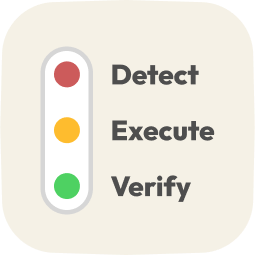
Your clients pay you for more than a fire-and-forget installation strategy. Every script deployment in ImmyBot runs in a Detect → Execute → Verify flow. First, ImmyBot checks for compliance and then executes if the detection returns false. Then, ImmyBot verifies that the execution was successful. Any errors are handled cleanly with throw “message” to prevent cascading failures and pinpoint exactly what failed.

From first script to full scale
With ImmyBot’s script library, deploying software like QuickBooks, AutoCAD, or custom apps becomes fast and repeatable no matter how many endpoints you’re updating. You can automatically remove unauthorized or outdated software, apply registry settings, VPN profiles, power plans, and more—all from a single platform. These workflows scale across users, workstations, and tenants while enforcing strict version control.
VS Code-style script editor built right in
ImmyBot’s script editor features IntelliSense, syntax highlighting, dynamic parameters, search shortcuts, and version control. Built-in helpers and function scripts like Registry-Should-Be and FileShould-Be let you reuse logic and avoid reinventing the wheel. You can also test scripts in ImmyBot’s debugger and automatically run detection tests that return compliance information.
What customers are saying

“With Immy, not only are we able to easily onboard new devices that are setup consistently, we have been able to deploy new software to some of our larger customers at a moment’s notice. Everybody wins.”
—Mason Feuhrer, ERGOS Technology Partners, Inc.

Ready to try it for yourself?
Try out every feature of ImmyBot firsthand with our free trial, and discover exactly how it can streamline your workflow—risk-free and commitment-free.
Start your free trial
14-day free trial. No credit card required.